
Using Azure CycleCloud for Scientific Computing

Azure CycleCloud transforms how scientists and engineers approach high-performance computing in the cloud by bringing familiar HPC schedulers like SLURM, PBS, and Grid Engine into a scalable, cost-effective Azure environment. Unlike Azure Batch's managed service approach, CycleCloud lets you use the same schedulers and workflows you already know from on-premises clusters while gaining cloud elasticity and virtually unlimited compute resources.
This comprehensive guide covers everything from initial setup to cost optimization strategies, specifically designed for researchers who understand Linux and HPC concepts but are new to cloud-based computing infrastructure.
Understanding Azure CycleCloud's role in cloud HPC
Azure CycleCloud is Microsoft's enterprise HPC orchestration platform that acts as a bridge between traditional on-premises computing and cloud resources. The platform currently runs version 8.7.1 with significant 2024-2025 updates including enhanced security features, identity-based storage access, and the revolutionary CycleCloud Workspace for Slurm offering that reduces deployment time from weeks to minutes.
At its core, CycleCloud solves the fundamental challenge facing scientific computing organizations: how to scale computational resources beyond physical constraints while maintaining familiar tools and workflows. Rather than forcing users to learn new cloud-native approaches, CycleCloud integrates seamlessly with established HPC schedulers, allowing researchers to submit jobs using the same commands they've used for years.
The platform excels in scenarios requiring dynamic scaling for variable workloads, hybrid cloud-bursting from on-premises clusters, and complex multi-physics simulations that benefit from Azure's specialized HPC virtual machine families. Research institutions from the University of Bath to academic medical centers have successfully migrated thousands of compute cores to CycleCloud, often achieving better performance than their original on-premises infrastructure.
Getting started with installation and configuration
Setting up CycleCloud requires attention to both Azure prerequisites and the installation process itself. Your Azure subscription needs a virtual network with appropriately sized subnets: use small CIDR ranges like /29 for the CycleCloud management VM, but ensure large CIDR blocks for compute clusters to accommodate scaling.
The fastest deployment method uses the Azure Marketplace. Generate SSH keys with:
ssh-keygen -f ~/.ssh/id_rsa -m pem -t rsa -N "" -b 4096
then search for "CycleCloud" in the Azure Portal marketplace. Enable System Managed Identity during deployment for simplified Azure authentication, and ensure you capture the public IP address for web interface access.
After deployment, browse to https://<public-ip>/ and accept the self-signed certificate warning. The initial configuration wizard guides you through creating site name, accepting license agreements, and establishing administrator credentials. Critical first step: add your SSH public key in the profile settings to enable cluster node access.
For CLI operations, download the cyclecloud-cli tools from your web interface and install locally:
wget https://<your-cyclecloud-domain>/static/tools/cyclecloud-cli.zip
cd /tmp && unzip cyclecloud-cli.zip
cd cyclecloud-cli-installer && ./install.sh
export PATH=${HOME}/bin:$PATH
Initialize CLI connection with cyclecloud initialize, providing your CycleCloud server URL, credentials, and accepting the SSL certificate. Test connectivity using cyclecloud show_cluster to verify proper authentication.
Essential CLI commands for cluster management
CycleCloud's command-line interface provides comprehensive cluster lifecycle management. Account management begins with cloud credential configuration: cyclecloud account create -f account.json establishes Azure access, while cyclecloud account list shows configured providers.
Core cluster operations follow intuitive patterns. Create clusters using cyclecloud create_cluster <template> <name> -p params.json, specifying template types like "slurm" or "pbspro" with customized parameter files. Start clusters with cyclecloud start_cluster <cluster-name> and monitor progress using cyclecloud show_cluster <cluster-name> to track node provisioning status.
Node-level management includes cyclecloud show_nodes <cluster-name> for status monitoring and cyclecloud connect <node-name> -c <cluster> for direct SSH access. For Slurm environments, the specialized azslurm command provides scheduler-specific operations like sudo azslurm scale for post-configuration scaling and sudo azslurm cost -s 2024-01-01 -e 2024-01-31 for detailed cost analysis.
Project management enables custom cluster configurations through cyclecloud project init <project-name> and cyclecloud project upload <locker> for deploying custom applications and configurations to your compute environment.
Choosing between CycleCloud and Azure Batch
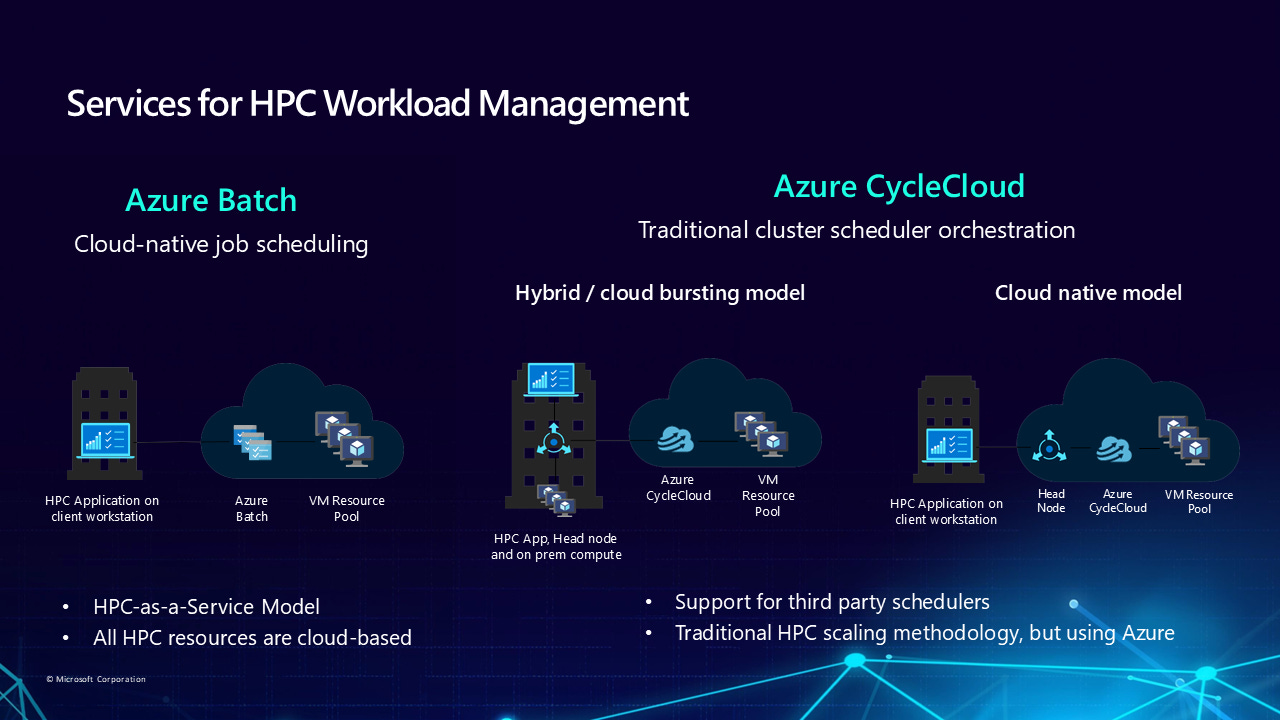
The decision between CycleCloud and Azure Batch depends on your HPC background and operational preferences. CycleCloud serves organizations with existing HPC expertise who want familiar schedulers and full cluster control, while Azure Batch provides a managed Platform-as-a-Service for cloud-native applications.
Choose CycleCloud when you need to migrate existing on-premises HPC workflows, require specific scheduler features like SLURM partitions or PBS job arrays, or want granular control over cluster topology and networking. CycleCloud excels for complex scientific simulations requiring InfiniBand networking, tightly-coupled MPI applications, and hybrid cloud-bursting scenarios where on-premises resources extend into Azure for peak workloads.
Azure Batch better suits developers building cloud-native applications, simple batch processing workflows, or scenarios where you want minimal operational overhead. The managed service approach eliminates cluster management complexity but limits scheduler customization options.
From a cost perspective, CycleCloud adds approximately $150/month for the management VM when running continuously, while Azure Batch charges only for underlying compute resources. However, CycleCloud's sophisticated autoscaling and cost optimization features often result in lower total costs for HPC workloads.
Integrating with popular HPC schedulers
CycleCloud's scheduler integration represents its greatest strength for scientific computing environments. SLURM integration has been completely rewritten in version 3.0, providing dynamic node creation, multiple partition support, and enhanced MPI optimization through single VM Scale Sets that ensure proper InfiniBand connectivity for tightly-coupled applications.
The new CycleCloud Workspace for Slurm offering simplifies deployment dramatically, providing pre-configured environments with PMIx v4, Pyxis, and enroot for containerized AI/HPC workloads. This marketplace solution includes Visual Studio Code access, automated Azure NetApp Files integration, and preset HTC, HPC, and GPU partitions with intelligent autoscaling policies.
PBS Professional integration supports both open-source OpenPBS and commercial Altair PBS Professional through dedicated GitHub repositories and azpbs CLI tools. The integration handles placement groups automatically for MPI jobs and provides sophisticated resource mapping between Azure VM characteristics and PBS resource specifications.
LSF, Grid Engine, and HTCondor integrations follow similar patterns, with scheduler-specific autoscaling plugins that monitor job queues and make scaling decisions based on workload demand. Each scheduler maintains its native job submission syntax and management commands while gaining cloud elasticity through CycleCloud's orchestration layer.
Cost optimization strategies that work
Effective cost management in CycleCloud requires a multi-layered approach combining intelligent scaling, strategic VM selection, and proactive monitoring. CycleCloud's built-in cost tracking provides real-time cluster expense monitoring with customizable budget alerts delivered via email, Teams, or Slack integration.
Autoscaling configuration represents the foundation of cost optimization. Enable autoscaling by default with 15-minute idle timeouts, but configure MaxCoreCount limits to prevent runaway costs from misconfigured jobs. Use dynamic partitions in SLURM and queue-specific scaling policies to match resource provisioning with workload characteristics – HTC jobs can tolerate longer startup times for cost savings, while HPC jobs may justify premium instance costs for faster time-to-solution.
VM selection requires careful workload analysis. HB-series VMs with AMD EPYC processors excel for memory bandwidth-intensive applications like computational fluid dynamics, while HC-series Intel Xeon instances optimize CPU-intensive molecular dynamics simulations. Start with smaller instance sizes and scale based on measured utilization rather than theoretical peak requirements.
Spot instance implementation can reduce costs by up to 90% for fault-tolerant workloads. Configure with Interruptible = true and MaxPrice = -1 to avoid price-based evictions while accepting capacity-based interruptions. Best practices include limiting Spot usage to jobs under one hour duration, implementing proper checkpointing, and maintaining separate queues for Spot versus regular-priority work.
For predictable workloads, Azure Reserved Instances provide up to 72% savings with one or three-year commitments, while Azure Savings Plans offer 11-65% savings with flexible hourly spend commitments across regions and instance types.
Sample configurations and templates
Understanding CycleCloud's configuration structure accelerates deployment and customization. A basic SLURM cluster template defines node arrays, machine types, and scheduler-specific settings:
[cluster basic-slurm]
FormLayout = selectionpanel
Category = Schedulers

[[node defaults]]
Credentials = $Credentials
Region = $Region
KeyPairLocation = ~/.ssh/cyclecloud.pem

[[node scheduler]]
MachineType = $SchedulerMachineType
ImageName = $SchedulerImageName
[[[cluster-init cyclecloud/slurm:scheduler:4.0.3]]]

[[nodearray htc]]
MachineType = $HTCMachineType
MaxCoreCount = $MaxHTCExecuteCoreCount
Interruptible = $HTCUseLowPrio
[[[configuration]]]
slurm.autoscale = true
slurm.hpc = false
Project structures organize custom configurations through directories for templates, specifications, and binary files. The specs/default/cluster-init structure contains boot-time scripts and configuration files that customize node behavior during provisioning.
Storage configurations integrate high-performance filesystems through mount specifications. Azure NetApp Files integration uses NFS mount configurations specifying mountpoint, export path, and server addresses, while BeeGFS and Lustre require more complex parallel filesystem setup procedures.
Troubleshooting common deployment issues
New CycleCloud users frequently encounter predictable issues with straightforward solutions. Empty subnet dropdowns during cluster creation typically resolve by waiting 10-15 minutes for Azure subnet detection, while ensuring correct region selection in both cluster parameters and Azure resource locations.
Quota-related scaling failures manifest as systemctl startup errors for scheduler daemons. Verify Azure subscription quotas for selected VM families before deployment, and ensure autoscaling MaxCoreCount settings remain below available quotas. Use Azure's quota increase request process early in project planning to avoid deployment delays.
Storage account access issues appear as "Cannot access storage account" errors during cluster initialization. Grant the "Microsoft.Storage/storageAccounts/listKeys/action" permission to your CycleCloud service principal or managed identity. For detailed troubleshooting, SSH to problematic nodes using the cyclecloud user account and examine /opt/cycle/jetpack/logs/ for specific error messages.
Chef configuration failures during node customization often indicate script execution problems rather than CycleCloud platform issues. Review command outputs in node detail panels and use the "Keep Alive" toggle to prevent automatic node shutdown during debugging sessions.
Advanced optimization techniques
Performance optimization in CycleCloud requires understanding the interaction between Azure infrastructure and HPC workload characteristics. For MPI applications requiring low-latency communication, configure single VM Scale Sets using Azure.SingleScaleset = true and enable SR-IOV with InfiniBand networking through HB or HC-series virtual machines.
Storage performance optimization involves matching filesystem types to access patterns. Use Azure Managed Lustre for large-scale parallel I/O workloads, Azure NetApp Files for databases and shared application storage, and Azure HPC Cache to improve access to blob storage and on-premises NAS systems. Implement storage lifecycle policies that automatically move cold data to lower-cost tiers while maintaining hot data on high-performance storage.
Custom node configuration through CycleCloud's three-tier approach enables sophisticated cluster customization. Use custom images for time-intensive software installations, cloud-init for early boot network configuration, and CycleCloud projects for dynamic application deployment and user management.
Security hardening includes SSL/TLS configuration for all cluster communications, Network Security Group policies that restrict access to essential ports, and integration with organizational Active Directory or LDAP systems for consistent user authentication across hybrid environments.
Learning resources and next steps
Microsoft provides comprehensive documentation through Microsoft Learn training modules, including hands-on exercises for cluster creation, scheduler integration, and workload optimization. The official documentation hub at learn.microsoft.com/azure/cyclecloud offers installation guides, API references, and troubleshooting resources updated regularly for new platform releases.
GitHub repositories contain community-contributed templates for specialized applications including bioinformatics workflows, computational chemistry applications, and engineering simulation environments. The Azure CycleCloud community actively shares best practices through Microsoft Tech Community forums and research computing networks.
Professional development opportunities include Microsoft's CycleCloud Learning Circles for academic users, partner-delivered training programs, and certification paths for cloud-based HPC administration. Research institutions benefit from Microsoft's academic partnerships providing deployment assistance and optimization consulting.
For immediate next steps, start with the CycleCloud Workspace for Slurm marketplace solution to experience simplified deployment, then progress to custom cluster configurations as your comfort level increases. The combination of familiar HPC tools with cloud scalability positions Azure CycleCloud as the ideal platform for scientific computing organizations ready to embrace cloud-first computational approaches while maintaining operational continuity with existing workflows and expertise.
Azure CycleCloud successfully bridges the gap between traditional HPC environments and modern cloud computing, providing scientists and engineers with the tools they need to scale computational research without abandoning familiar workflows or requiring extensive cloud expertise. The platform's continuous evolution and growing ecosystem ensure it remains at the forefront of cloud-based scientific computing solutions.